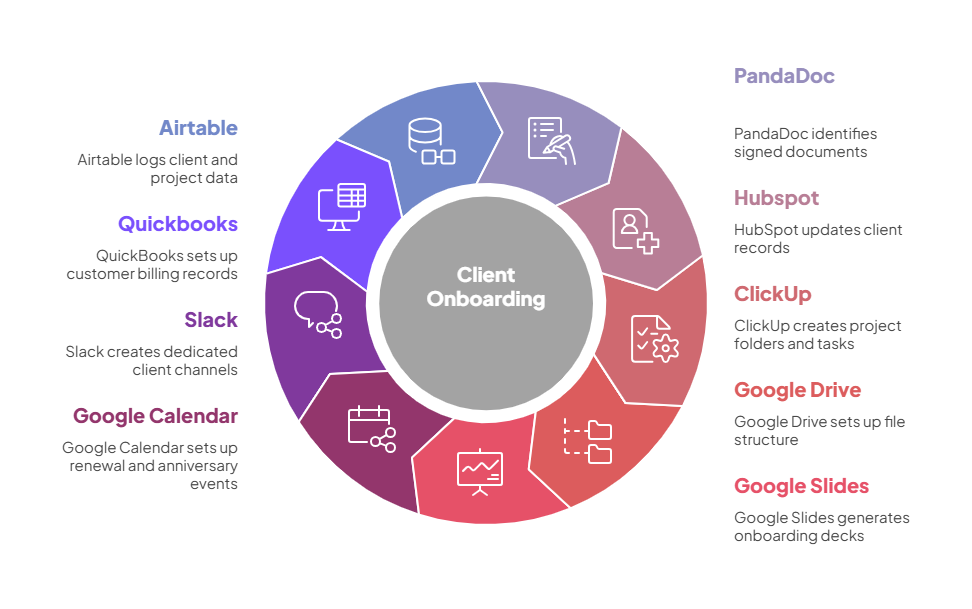
An agentic automation that fires the instant a client signs a proposal, setting up their entire operational footprint across nine systems in under a minute: CRM updates, project folders, task boards, billing records, onboarding decks, a dedicated Slack channel, renewal reminders, and a client anniversary event, all from a single signature.
The Problem
A client signs your proposal. Congratulations. Now the real work begins, and it has nothing to do with the actual deliverable.
Before your team can start serving this client, someone (usually a project manager, an ops lead, and a finance person working in sequence) needs to:
- Update the deal in HubSpot to Closed Won and set the close date
- Update the company record to reflect its new "Onboarding" lifecycle stage
- Create a client folder in Google Drive with the right subfolder structure: Proposals, Meetings, Reports, Creative, Content, Admin, and half a dozen more
- Download the signed proposal from PandaDoc and save a PDF copy in the Proposals folder
- Create an onboarding presentation deck from the company template
- Create a pre-onboarding sales deck for the handoff meeting
- Create a new folder in ClickUp under the right space (Agencies vs. End-Clients, depending on client type)
- Create Client Tasks and Internal Tasks lists in that folder
- Create standing tasks for internal meetings, client meetings, and general admin time tracking
- Create the technical onboarding task from a template and assign it with a due date
- Create the "Your First ClickUp Task" walkthrough for the client
- Create the account access request task
- Create a work order task so someone adds the work order list to the client folder
- Create a Slack channel named after the client code
- Create the client as a customer in QuickBooks with full billing address, contact info, and tax settings
- Create an urgent task to review and send the initial invoice
- Create an urgent task to set up payment processing
- Log the new client record in the Airtable client database
- Log the ClickUp folder details in Airtable for cross-referencing
- Create a 45-day sales follow-up task in HubSpot to check on the client's experience
- Create 90-day, 60-day, and 30-day pre-renewal reminder tasks in HubSpot
- Create a 90-day pre-renewal calendar event
- Create a one-year client anniversary event on the team calendar, with a week's advance notice so everyone can send congratulations
That's 23 distinct setup steps across nine different systems. In practice, it takes two to four hours of cumulative effort spread across multiple people over the first day or two after the deal closes. Some steps get forgotten. Some get done inconsistently. And the client's first impression of your operations depends on whether the right person remembered to create the right things in the right order.
Every agency owner knows the feeling. You close a deal on a Thursday afternoon, your ops lead is out on Friday, and when the new client asks for access to their project board on Monday morning, nobody has set it up yet. You scramble. You apologize. You explain that "we're just getting your workspace ready." The client smiles, but the first seed of doubt is planted. These people aren't as organized as I thought.
The real cost isn't the setup time. It's the inconsistency. One client gets a perfectly structured onboarding. Another is missing their Slack channel for three days. A third never gets the renewal reminders created because the person responsible was out sick. The quality of the client experience depends on who happens to be available when the proposal is signed. And that's not a standard. That's a gamble.
How It Works
Step by Step
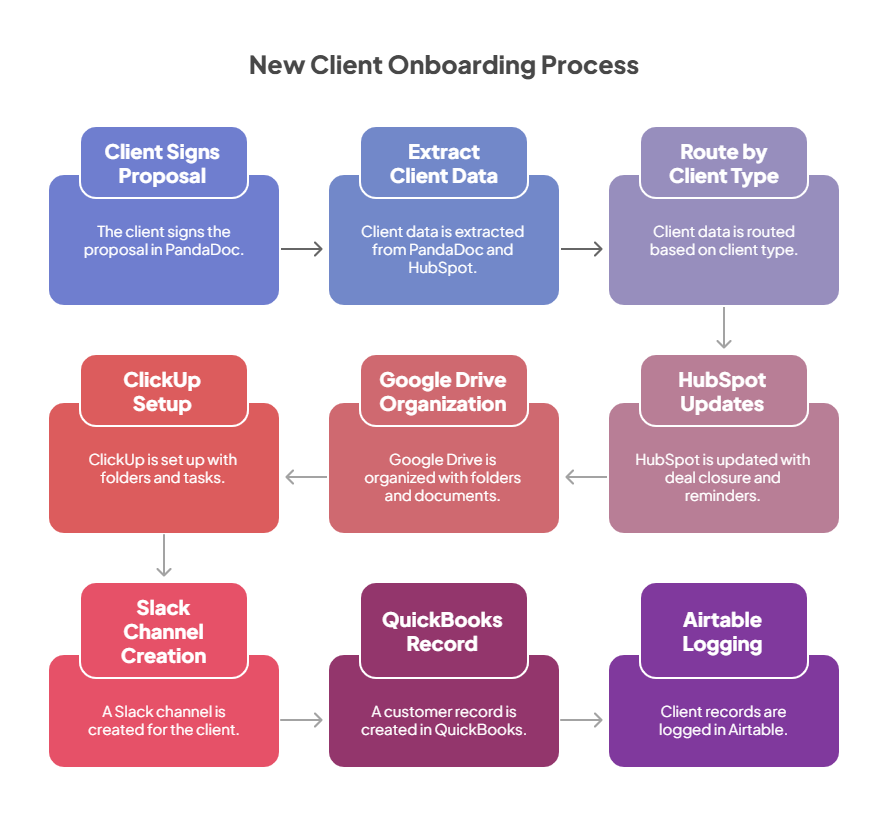
A client signs the proposal, and everything begins. PandaDoc detects the signed document and triggers the automation. The system retrieves the full document details (pricing, quantities, service codes) and looks up the associated company, deal, and contact in HubSpot. Thirty variables are captured in one pass: company name, address, client code, contact details, deal owner, pipeline, currency, pricing, and more. This data feeds every downstream step.
The deal is closed and the CRM is updated immediately. The HubSpot deal moves to Closed Won with today's close date. The company record is updated to the "Onboarding" lifecycle stage. These aren't draft updates waiting for approval. The CRM reflects reality the moment the signature lands.
Renewal reminders are planted for the future. The automation thinks ahead. A 45-day sales follow-up task is created in HubSpot so someone checks on the new client's experience early. Three pre-renewal tasks are scheduled at 90, 60, and 30 days before the annual renewal date, each assigned to the deal owner with a clear description of what's due. A calendar event is created for the 90-day renewal mark. A one-year client anniversary event goes on the team calendar with a week's advance notice and a reminder to celebrate the milestone. Eleven months from now, someone on your team will get a reminder they didn't create, for a task they didn't schedule, and they'll act on it because it's right there in their calendar.
A complete Google Drive structure is built in seconds. A root folder is created using the client code and company name. Inside it, eleven subfolders are created covering every aspect of the client relationship: Proposals, Meetings, Reports, Client Dropbox, Admin, Campaigns, Creative, Content, Website, PPC, and Onboarding. The signed PandaDoc proposal is downloaded as a PDF and saved directly into the Proposals folder. Inside the Onboarding folder, presentation decks are generated from company templates: an onboarding deck and a pre-onboarding sales deck, ready for the kickoff meeting.
ClickUp is set up with the full project structure. A new client folder is created in the right ClickUp space (Agencies or End-Clients, depending on the client type), with Client Tasks and Internal Tasks lists. Then a series of starter tasks are generated: standing tasks for internal meetings, client meetings, and general admin (for time tracking), a technical onboarding task from a template (assigned and dated), a "Your First ClickUp Task" walkthrough for the client, an account access request task, and a work order task. The client's project management home is ready before anyone on the team opens ClickUp.
Slack, QuickBooks, and the data layer are all configured simultaneously. A dedicated Slack channel is created using the client code, giving the team a centralized place to discuss this client's work from day one. A full customer record is created in QuickBooks with the company name, billing address, contact information, website, phone number, email, currency, tax settings, and payment terms. Two urgent ClickUp tasks are created with a next-day deadline: one to review and send the initial invoice, and one to set up payment processing. The finance team knows exactly what they need to do, and it's already due tomorrow. The new client record is logged in Airtable with the full details from HubSpot and PandaDoc, and the ClickUp folder details are recorded so that every downstream automation can find the right workspace for this client.
The entire operational footprint is live before your team finishes reading the "document signed" notification. Twenty-three setup steps across nine systems. Zero-touch. Every client gets the identical, complete setup regardless of who's in the office, what day it is, or how many other deals closed this week. That's not efficiency. That's a new standard.
The Outcome
Before |
After |
|---|---|
| Client setup takes 2-4 hours spread across multiple people | Entire operational footprint is created in under a minute |
| Quality depends on who's available when the deal closes | Every client gets the identical, complete setup |
| Google Drive folders are created manually, with some clients missing subfolders for months | 12-folder structure with signed proposal and presentation decks, created automatically |
| ClickUp project setup is forgotten or inconsistent | Folder, lists, and 7-8 starter tasks are generated from templates |
| Renewal reminders depend on someone remembering to create them | 90/60/30-day reminders and anniversary events are planted automatically |
| QuickBooks customer creation waits for finance to notice the new client | Customer record is created instantly with full billing details |
| Slack channel creation depends on someone remembering | Dedicated client channel exists from minute one |
| Some onboarding steps get missed entirely | 23 setup steps execute across 9 systems. Nothing is missed. Nothing is late. Nothing depends on memory. |
What this means in practice
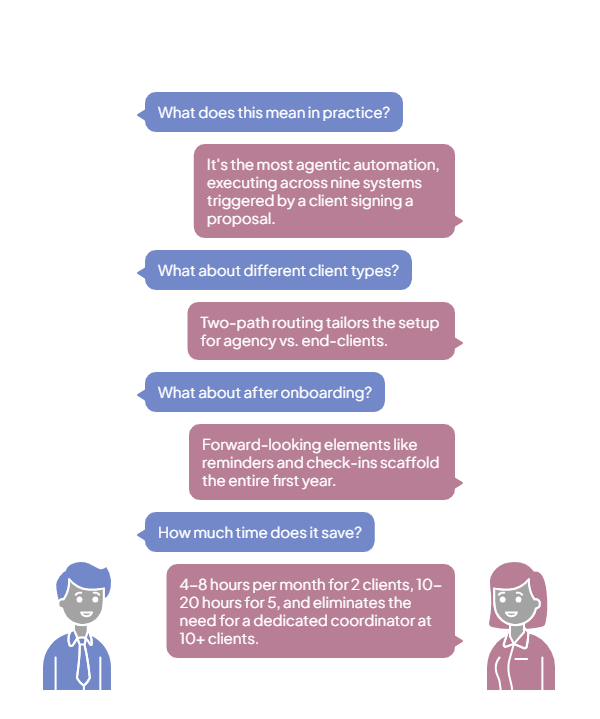
This is the most agentic automation in the catalog. It doesn't draft anything for review. It doesn't flag items for someone to create. It executes across nine systems: updating CRM records, creating folders and files, generating tasks and assignments, setting up billing records, creating communication channels, and scheduling future reminders. All triggered by the single act of a client signing a proposal.
The two-path routing (Agency clients vs. End-Clients) means the setup is tailored, not generic. Agency clients get tasks specific to that relationship model. End-clients get PM and pre-onboarding tasks that agencies don't need. Both paths get the full infrastructure, but the operational details match the client type.
The forward-looking elements are what make this more than setup automation. The 90/60/30-day renewal reminders, the 45-day experience check-in, and the one-year anniversary event mean the automation isn't just onboarding the client. It's scaffolding the entire first year of the relationship. That's the compounding value of systematic onboarding: every client gets the same future-proofing, regardless of which PM is managing the account.
For an agency signing 2 new clients per month, this saves 4-8 hours and eliminates missed steps. At 5 clients per month, it saves 10-20 hours and replaces what would require a dedicated onboarding coordinator. At 10 or more per month, it's the only way to maintain quality without adding headcount. The setup happens in the background, instantly, completely, every time. Zero-touch onboarding that never forgets a single step.
Systems Involved
Why This Matters for Agencies
Client onboarding is the moment that sets the tone for the entire relationship. A client who signs a proposal and sees a ClickUp board ready, a Slack channel waiting, and an onboarding deck prepared thinks: "These people are on top of it." A client who signs and hears nothing for two days while someone manually creates folders thinks: "I wonder if this was the right choice."
This automation compresses 23 manual steps across 9 systems into a single automated event. The proposal signature is the only human action required. Everything else happens automatically, immediately, and identically for every client. No missed steps, no inconsistency, no setup delays. Just a fully operational client environment, ready before your team finishes reading the notification. Production-grade onboarding, battle-tested across 58+ concurrent clients. The kind of first impression that turns new clients into long-term partners.