An agentic automation that monitors every client's hour utilization against their purchased budget on a schedule, sends an early warning when they're approaching their limit, and when they exceed it, fires an alert to the team AND automatically changes every active task for that client to BILLING BLOCKED, stopping unauthorized work before it accrues.
The Problem
Agency billing runs on purchased hours. A client buys a retainer of 40 hours per month. The team works those hours across multiple tasks. Time gets tracked. Somewhere, theoretically, someone is watching to make sure the team doesn't blow past that 40-hour mark.
In practice, nobody is watching. Not really. And the failures happen in three predictable ways.
The PM is too busy to check. Project managers are managing multiple clients, attending standups, writing briefs, reviewing deliverables. Pulling up each client's utilization to compare tracked hours against purchased hours isn't urgent until it's an emergency. By the time they look, the team has already tracked 47 hours against a 40-hour retainer. Seven hours of work the client didn't authorize. Seven hours the agency will either bill awkwardly or eat entirely.
The account manager doesn't know in time. The AM is the one with the client relationship. They're the one who needs to have the conversation about additional hours or scope expansion. But they find out the budget is blown after the work is done. The only options are an uncomfortable billing conversation ("We went over your hours last month and need to invoice you for the overage") or absorbing the cost. Neither one feels good. Neither one was necessary if someone had flagged the issue two days earlier.
The developer doesn't look before they start. Developers open a task and start working. They're not checking the client's remaining budget before they begin. That's not their workflow, and they wouldn't know where to look even if they wanted to. A developer starts a task that takes 6 hours on a client with 2 hours remaining. Nobody catches it until the billing reconciliation at the end of the month.
The root cause is the same in all three cases. The information about budget status lives in the data layer. The people who need it live in Slack and ClickUp. The gap between where the data is and where the decisions happen is where money leaks out.
And here's the part most agencies miss: notifications alone don't solve this. Telling someone the budget is blown doesn't stop the bleeding. The developer still has tasks in their queue showing "in progress." The notification is an FYI. What's needed is an intervention. Something that actually stops work from continuing on an over-budget client without requiring a human to manually find and update every active task.
That's the difference between an alert and an enforcement action. And it's the difference between knowing about margin erosion and preventing it.
How It Works
Step by Step
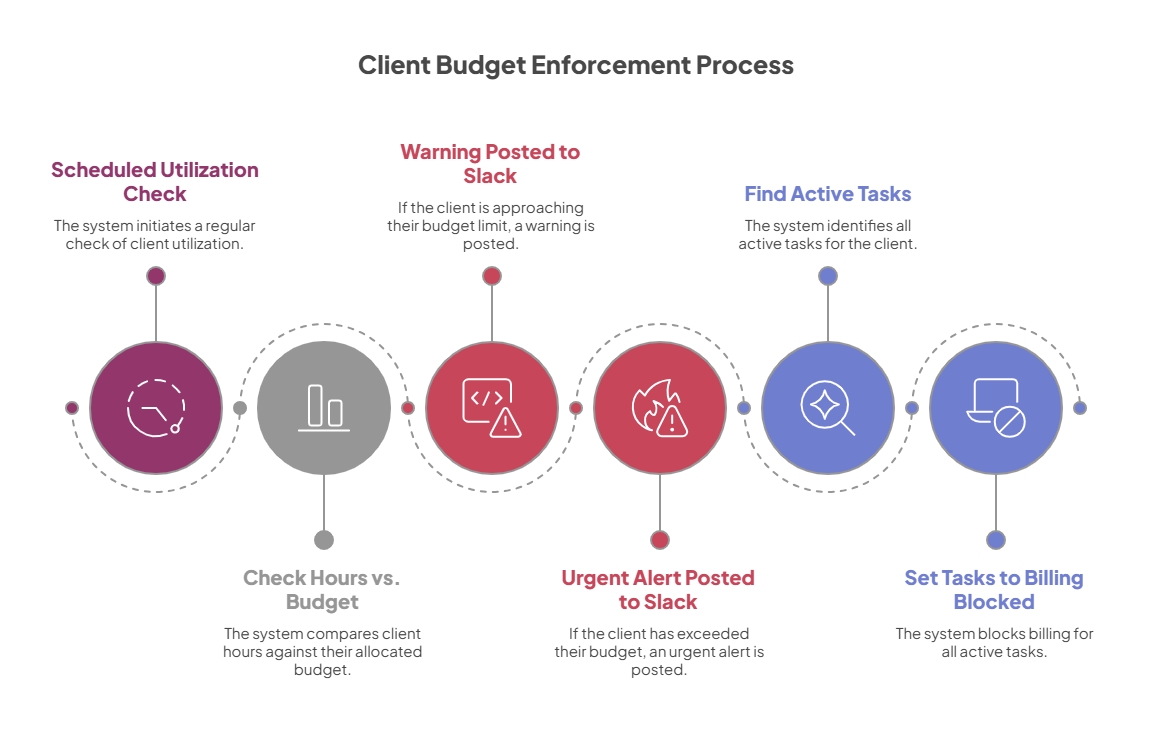
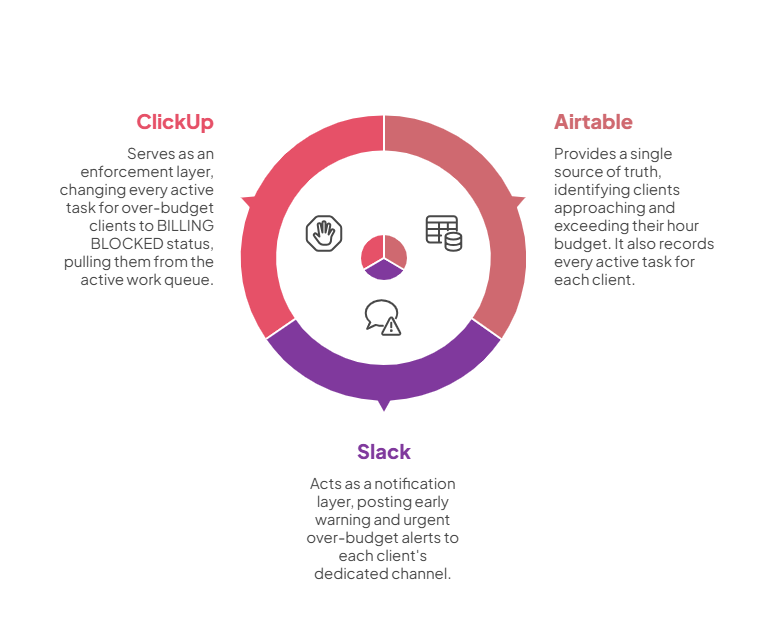
The automation runs on a schedule, checking every client's utilization. This isn't triggered by a single event. It runs periodically to catch clients creeping toward their limits before anyone realizes it. Two parallel checks execute simultaneously, each reading a different filtered view from the data layer.
Tier 1: Approaching Utilization. The first check identifies clients whose tracked hours are approaching their purchased budget. For each client found, the automation posts a warning to that client's dedicated Slack channel with full context: client name, hours purchased, engagement type, billing type, and hours tracked to date. This is the heads-up. The PM sees it and knows to start planning. The AM sees it and can proactively reach out to the client about additional hours. No one needs to check a dashboard. The information arrives where the team is already working.
Tier 2: Over Utilization. The second check identifies clients who have exceeded their budget. This triggers two actions, not one. First, a more urgent alert posts to the client's Slack channel with the same data points but higher severity. This isn't a heads-up. It's a stop-work signal.
Then the automation enforces the stop. The data layer maintains a record of every active task for each client. When a client exceeds their budget, the automation retrieves that full list, loops through every task, and changes each one's status to BILLING BLOCKED. This is the critical step. It doesn't just inform. It intervenes. Every active task for that over-budget client changes status in ClickUp. A developer opening their task list doesn't see "in progress." They see "BILLING BLOCKED." They can't miss it. They can't accidentally work on it. The status itself communicates what happened and what to do: nothing, until billing is resolved.
Every alert routes to the correct client channel automatically. The automation uses the client code to determine the destination channel. Adding a new client doesn't require modifying the automation. The channel naming convention handles routing for every client in the system, current and future.
The Outcome
Before |
After |
|---|---|
| PMs have to manually check utilization for each client, one at a time | Approaching-limit warnings arrive automatically in the client's Slack channel |
| AMs find out about budget overages after the work is done | AMs get early warning while there's still time to have the conversation |
| Developers start tasks without knowing the client has no remaining budget | Over-budget tasks show BILLING BLOCKED, impossible to miss |
| Over-utilization is discovered during end-of-month billing reconciliation | Over-utilization triggers both a notification AND active task blocking |
| Stopping unauthorized work requires a PM to manually find and update every active task for that client | Every active task for the over-budget client is blocked automatically, in seconds, without a single human click |
What this means in practice
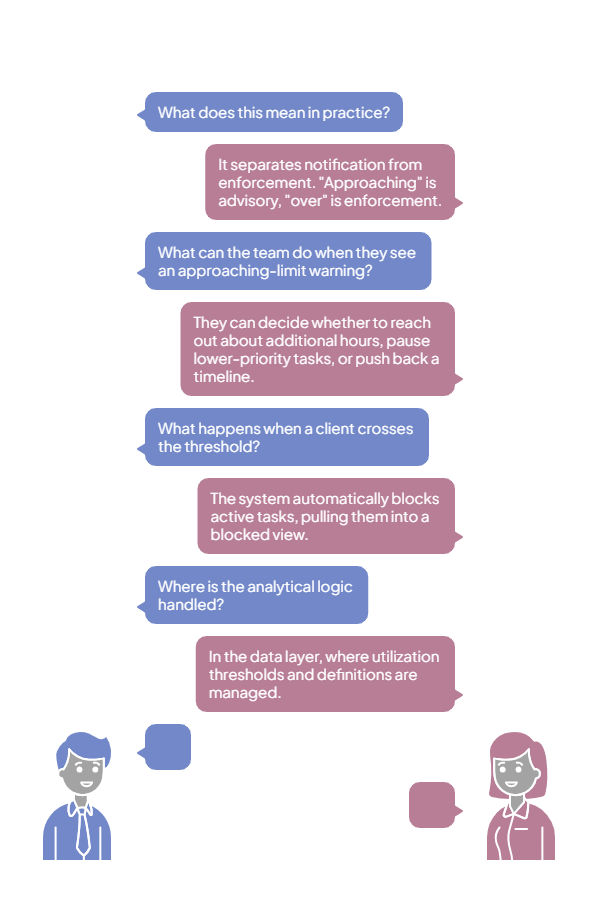
This is what separates a notification from an enforcement action. The two-tier design reflects how budget problems actually escalate. "Approaching" is an advisory. The team should be aware. The AM might want to start a conversation. The PM should prioritize remaining hours carefully. "Over" is an enforcement action. Work stops until the billing situation is resolved. Having both tiers means the team gets a chance to manage the situation gracefully before the system intervenes on their behalf.
The approaching-limit warning is where human judgment stays in control. When the team sees that a client is nearing their budget, they can decide: should we reach out about additional hours? Should we pause lower-priority tasks? Should we push back the timeline on something? That's a business decision, and the automation gives the team the information they need to make it while there's still time.
The task blocking is where the system takes over. Once a client crosses the threshold, the automation doesn't wait for someone to act. It changes every active task status immediately, pulling those tasks out of the active work queue and into a blocked view. The developer's board is clean. Everything they see is authorized work. Everything that isn't authorized is clearly marked.
The data layer handles all the analytical logic. The utilization thresholds, the calculation formulas, and the definition of "approaching" vs. "over" are all managed in the data layer, where they're easy to adjust. Changing the warning threshold from 85% to 90% means updating a filter, not modifying the automation.
Now extend this across your client base. At 15 clients, a PM might be able to manually track utilization with some effort. At 30 clients, it's a daily ritual that takes an hour and still misses things. At 50 or more, it's physically impossible without automation. This automation scales linearly. Whether you have 10 clients or 100, every single one gets the same budget monitoring, the same early warning, and the same enforcement action if they exceed their hours. That's the ops team that never takes a day off.
Systems Involved
Why This Matters for Agencies
Unauthorized hours are the most common source of margin erosion in agency operations. It's rarely malicious. It's a developer who starts a task without checking. A PM who's managing too many accounts to track utilization daily. An AM who doesn't know the budget is blown until the invoice goes out. The manual version of budget enforcement depends on human memory, human discipline, and human availability. All three fail under pressure, and agencies are always under pressure.
This automation turns budget enforcement from a human discipline problem into a system-level guarantee. When a client approaches their limit, the team gets a warning with time to act. When a client exceeds their hours, work stops. Not because someone remembered to check, not because a PM caught it during their Friday review, but because the system intervened the moment the threshold was crossed. Production-grade automations that never forget, never get sick, never cut corners. That's the difference between managing margins and watching them erode.